Free wins this category, honestly. Adobe Scan is free and produces clean, correctly-sized PDFs. Microsoft Lens is free and excellent at whiteboard-style capture correction. Apple's built-in Notes scanner is free and already on your phone.
Paid options like CamScanner's premium tier add OCR, extra cloud storage, and batch processing. Useful if you scan documents weekly. For a once-a-year e-visa, the free tier of anything is enough. What actually matters is not the app but the output: color scans, all four corners of the passport page visible, file sizes within the portal's limits. A free scan that meets spec beats a paid scan that does not.
What the scanner actually has to produce
The honest way to judge scanner apps is against the evisa documents that portals actually request. We counted them across this site's collection: 401 destination-and-nationality records that list their required documents, out of 439 records in total.
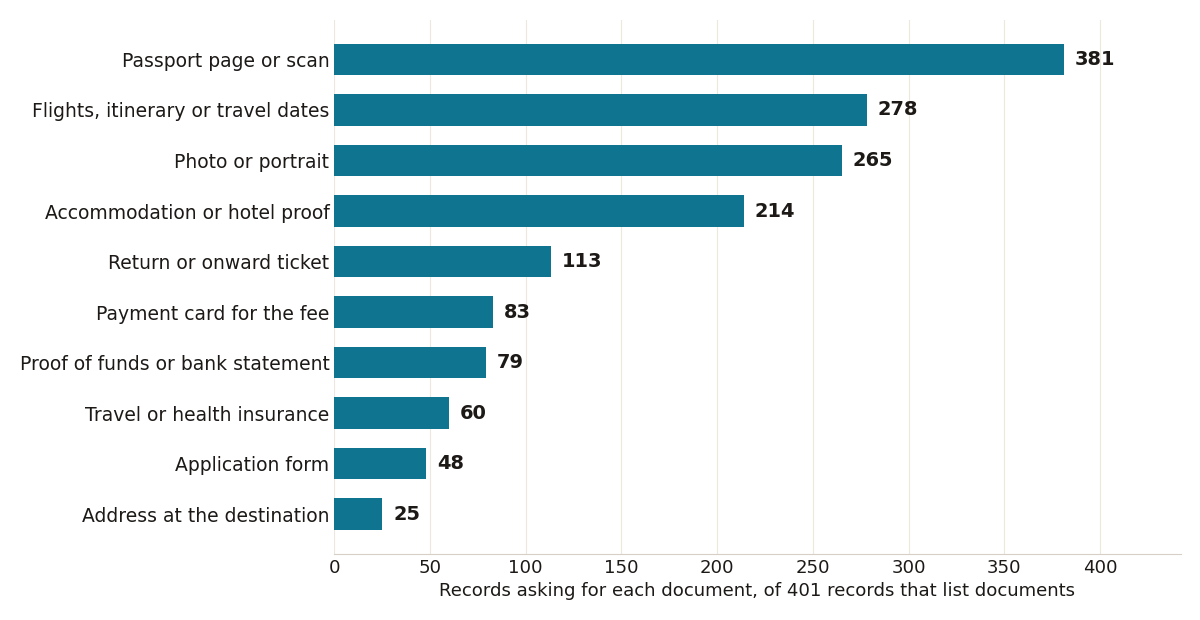
Source: EVisaDocuments collection via its public search index, harvested October 2026 (n = 401 records listing documents).

The passport page is nearly universal: 381 of 401 lists ask for it, which is why every scanner comparison really starts with one question, whether the app keeps a passport page flat, legible, and uncropped at the edges. Flights, itineraries, or travel dates appear in 278 lists, and a photo or portrait in 265, so two out of three applications need a clean digital photo as well as scans. Accommodation proof shows up in 214 lists and a return or onward ticket in 113, and those two are usually paper or PDF confirmations rather than anything you photograph, which is where a scanner app that merges files into one tidy PDF earns its place. Proof of funds or a bank statement appears in 79 lists, insurance in 60, and a payment card for the fee in 83, a reminder that some portals treat the card itself as part of the document set.
Batch mode is the one paid feature with a real case: families apply together, and scanning four passports and four sets of confirmations one page at a time in a free app gets old fast. OCR, by contrast, is close to useless here. No portal reads the text out of your scan; a human or a rules engine checks that the image is complete, in color, and within the file size limit.
Two output details decide more applications than any app feature list. The first is glare: a passport page photographed under a ceiling light loses the machine-readable zone at the bottom, and portals reject the upload or, worse, accept it and reject the application later. Scanner apps that flatten, de-shadow, and force all four corners into the frame exist precisely for this document, and it is no accident that the passport page tops the chart at 381 of 401 lists. The second is file size. Portals cap uploads, sometimes tightly, and a beautiful 14 MB scan of a bank statement fails where a compressed 800 KB version passes. Every serious scanner app, free tiers included, exports at a size you choose; the paid tiers rarely choose it better.
Format matters less than people fear. Most portals take JPG or PDF, and a scanner that produces both covers the field. What you want to avoid is the screenshot habit: a photographed screen of a flight confirmation, re-cropped in a chat app and forwarded twice, arrives as a blurry thumbnail that no reviewer can read. Scan the original paper or export the original PDF, and keep the phone camera for the passport page and the photo.
The one file a scanner cannot fix
A scanner app will faithfully reproduce a photo at whatever size you hand it, and 265 of the 401 lists ask for a photo at a specific size and background. Wrong dimensions are a rejection the best scanner cannot prevent. The free Visa Photo Maker on this site handles that one file properly: it crops to 51x51 mm for US and India visas, 35x45 mm for Schengen, UK, and Canada visas, and 33x48 mm for China visas, with the background and pixel size each spec requires. Scan the paper with a free app, size the photo with the maker, and the paid tier has nothing left to sell you.
One caution from the pullquote above, because it matters with documents this sensitive: a free app with an unclear business model is a strange place to send your passport page. The built-in scanners from Apple, Microsoft, and Adobe at least answer to companies whose incentives you can name. Sources: U.S. State Department